
Start
Getting started
Windows remembers exactly one thing you copied. CopyPasta remembers all of them.
The first two minutes
- Copy some text from anywhere — a browser, a document, an email.
- Press Ctrl + Alt + V.
- Your text is at the top of the menu. Click it.
It pastes into wherever your cursor was. That is the whole idea; everything below is refinement.
The menus
There are three, and they all do the same kind of thing at different scopes.
| Shortcut | Opens |
|---|---|
| Ctrl Alt V | Everything — history, snippets and commands |
| Ctrl Alt H | History only |
| Ctrl Alt B | Snippets only |
| Click the tray icon | Same as Ctrl Alt V |
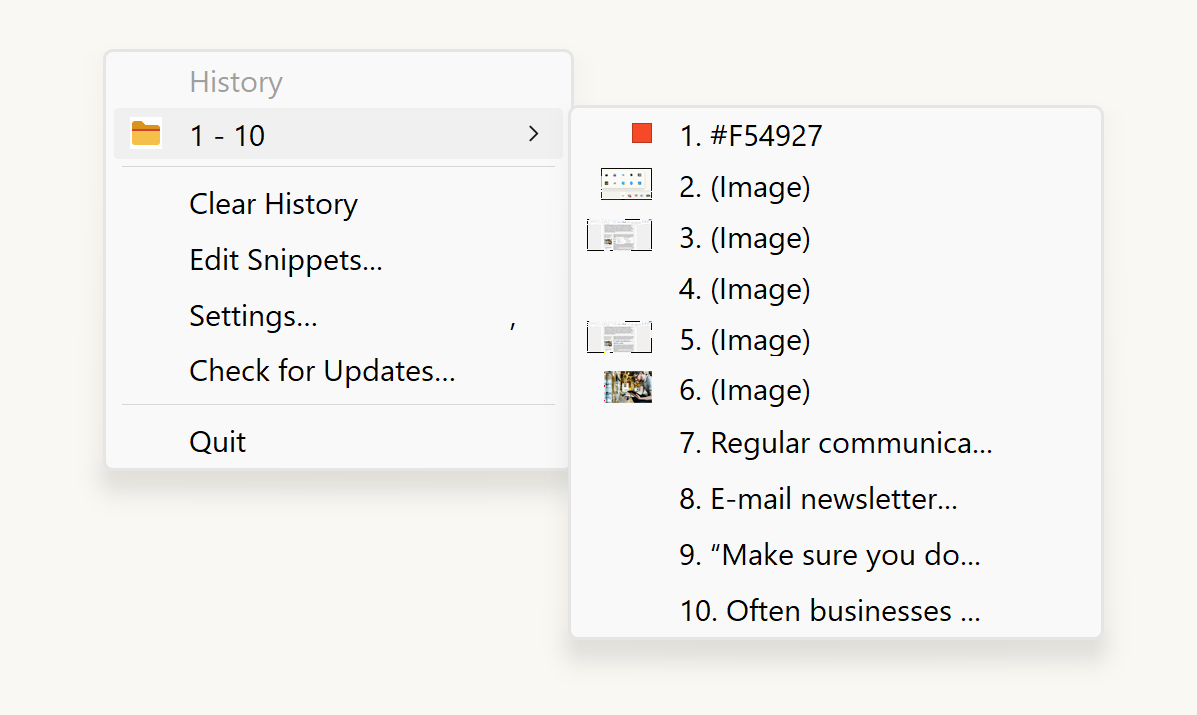
Reading the menu
Recent items are listed directly. Once the list gets past a set length, older entries are tucked into numbered folders — 11 - 20, 21 - 30 and so on — so the menu never runs off the screen.
Items are labelled by what they are:
- Plain text shows the first part of the text itself.
- (Image) entries show a small preview beside them.
- (Files) entries are files or folders you copied in Explorer.
- Colour codes such as
#3366ffget a swatch of that colour.#abc,#3366ffand#3366ffccall work — three, six or eight hex digits, with or without the#.
Choosing by number
The first ten items can be picked by pressing their number instead of clicking, if you turn that on in Settings → Menu → Let the first ten items be chosen by number. With the menu open, press 1 for the first item, 2 for the second, and so on.